The Laptop Processor Landscape: A Comparative Look at Apple M5, Snapdragon X Elite, and Intel Lunar Lake
Why Raw Performance No Longer Tells the Whole Story
By Sofia Laurent
Principal Computing Systems Researcher
Last Updated: May 6, 2026
Reading Time: 11 min read
The laptop processor market has entered a new era. Apple, Qualcomm, and Intel are no longer fighting over benchmark scores alone. Instead, they are competing to define the future of personal computing through AI, battery efficiency, software ecosystems, and platform design.
Before 2020, most people buying a laptop asked a simple question:
Should I get an Intel Core i5 or an i7? AMD Ryzen or Intel?
After 2025, the conversation has changed entirely:
MacBook Air or a Windows AI PC? Is Snapdragon worth buying? Can Lunar Lake really save Intel?
For many consumers, this is the first time they have realized that laptops may look similar on the surface, yet be built on fundamentally different computing architectures underneath. This is not a routine product refresh. It is the beginning of a new platform war.
Part 1: From CPU Competition to Platform Competition
For nearly two decades, Intel dominated the laptop market. According to Steam Hardware Survey data, AMD's continued Zen architecture improvements have narrowed the market-share gap in both desktop and mobile segments to historic lows, with Steam's user base now approaching an even split between the two companies (Hardware Times, 2025).
Today, three major camps coexist:
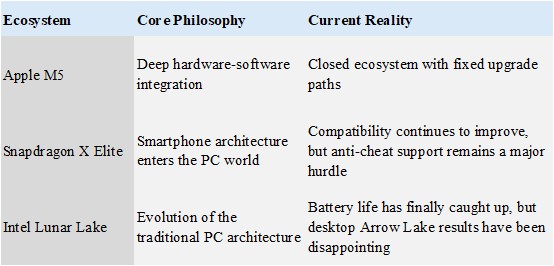
The key point is this:
This is no longer a chip war.
It is a battle between operating systems, software ecosystems, AI capabilities, and battery life.
Part 2: Apple M5 — Turning Laptops into Appliances
Most media coverage focuses on M5 performance numbers.
In reality, the greatest advantage of Apple Silicon is not benchmark scores.
Its greatest achievement is making computers behave more like household appliances—devices that simply work without requiring users to think about them.
Many Mac users cannot tell you their CPU model, memory frequency, or power consumption.
What they know is:
- It wakes instantly.
- Battery life lasts all day.
- The fan is rarely audible.
One photographer who switched from an Intel Mac to an M-series Mac told me the biggest change was not export speed. It was the fact that they stopped carrying a charger everywhere.
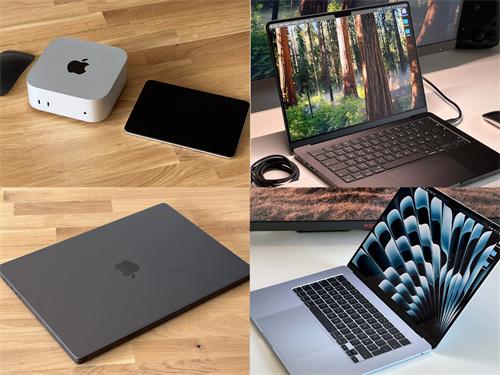
According to industry reports, Apple M5 is manufactured using TSMC's second-generation 3nm process (N3P) and has already shipped in the 2026 iPad Pro and MacBook Pro. Mac mini and iMac models are expected to follow during the third and fourth quarters of 2026 ("Mac Mini M5: Release Date, Price & Full Specs," 2026).
The Neural Engine is expected to deliver higher TOPS performance, but Apple's real moat remains the vertical integration between macOS and its hardware.
That advantage comes with trade-offs.
All memory and storage in Apple Silicon systems are soldered directly onto the motherboard and cannot be upgraded.
iFixit reportedly gave the M5 MacBook Pro a repairability score of just 4/10, while many Intel-based laptops score between 6 and 8 points (Tech Insider, 2026).
In practical terms, the configuration you buy today will remain the configuration you own for the entire lifespan of the machine.
Another frequently overlooked issue is Rosetta 2 translation overhead.
Although Apple has optimized the translation layer remarkably well, certain x86 applications still suffer a 10–20% performance penalty after translation.
For most users, this is effectively invisible.
For developers who depend on specific Windows toolchains, however, it can be a decisive reason not to switch.
Part 3: Snapdragon X Elite — The Most Misunderstood Platform
Most reviews run benchmarks, compare TOPS numbers, and stop there.
The real question is:
Has Windows on ARM finally matured?
Success Stories
Microsoft Office, web browsers, Zoom, and most modern AI applications now support ARM64 natively.
According to WiTechPedia's 2026 compatibility guide, more than 93% of commonly used consumer applications on Windows on ARM can now run natively (WiTechPedia, 2026).
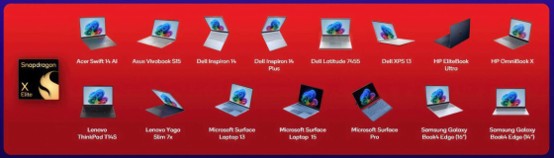
Options that powered by ARM architecture and Windows on ARM.
The Failure Cases
This is the area most likely to be overlooked by reviewers, yet it has enormous implications for ordinary users.
Epic Games' Easy Anti-Cheat is used by hundreds of multiplayer games.
Because these anti-cheat systems require kernel-level access, and ARM architectures differ fundamentally from x64 kernel implementations, Snapdragon X devices were historically unable to run games such as:
- Fortnite
- Apex Legends
- Destiny 2
In March 2025, Epic announced a partnership with Qualcomm to bring Easy Anti-Cheat support to Windows on Snapdragon systems.
By November 2025, Fortnite officially became playable on Snapdragon X devices.
Even then, performance remained behind x86 competitors.
At 1080p Medium settings, the X Elite delivers roughly 60 FPS, while the Intel Core Ultra 7 258V performs approximately 40% faster and the AMD Ryzen AI 9 HX 370 approximately 62% faster under the same conditions (Signal65, 2025).
Going from "cannot run at all" to "runs, but noticeably slower" is progress.
It is not yet enough to make Snapdragon X a mainstream gaming platform.
The Real Challenge of Enterprise Deployment
Gartner predicts that Windows on ARM devices could capture 20% of the PC operating system market by 2028.
The reality inside enterprise IT departments is more complicated.
A friend who serves as an IT manager for an engineering company in the Netherlands told me they tested Snapdragon X Elite laptops for field technicians.
Battery life was excellent.
The problem was that a legacy diagnostic application developed twenty years ago would not run on ARM.
The company ultimately adopted Numecent's Cloudpaging containerization platform to "transport" these legacy applications to ARM devices, adding both licensing costs and deployment complexity ("Deploy Any Application to Windows on Arm in Minutes with Cloudpaging," Numecent, 2025).
This is not a technological failure.
It is the reality of migration costs.
Part 4: Lunar Lake — Intel's Defining Moment
Most technology media discussions focus on Lunar Lake's NPU and TOPS ratings.
The more important question is:
Why must Intel win?
If Intel loses the mobile computing market, the future PC industry could become a duopoly dominated by Apple and ARM-based ecosystems.
Lunar Lake represents more than a product launch.
It is Intel's attempt to prove that x86 still has a future.
Intel Core Ultra Series 2 (Lunar Lake) offers roughly 48 TOPS of NPU performance, exceeding Microsoft's minimum 40 TOPS requirement for Copilot+ PCs.
For comparison:
- Snapdragon X2 Elite reaches approximately 80–85 TOPS
- AMD Ryzen AI 400 Series reaches roughly 60 TOPS
- Intel Lunar Lake provides around 48 TOPS
("NPU Comparison 2026: Intel vs Qualcomm vs AMD vs Apple," 2026)
Lunar Lake's greatest advantage is compatibility.
Legacy ERP systems, industrial software, and internal enterprise tools continue to run seamlessly on x86 systems without requiring emulation.
For business environments that need technology to work immediately, this remains a powerful advantage.
Yet Intel's challenges are equally obvious.
In Stable Diffusion image-generation testing, Lunar Lake's NPU requires approximately 22.26 seconds to generate a single image.
Snapdragon X Elite completes the same task in roughly 7.25 seconds while consuming less energy ("NPU Comparison 2026," 2026).
In the AI efficiency race, the legacy advantages of x86 increasingly become a burden.
Part 5: The AI Era Is Changing the Rules of Processor Competition
Many consumers have not yet realized that future processor competition may no longer revolve around Cinebench or Geekbench scores.
Instead, it may revolve around:
Who can run AI workloads most efficiently?
Running local models such as:
- Llama
- Gemma
- Mistral
as well as generating videos, creating images, powering voice assistants, and summarizing meetings places far greater demands on NPUs than traditional CPU benchmarks.
NPU Performance Comparison (2025–2026)
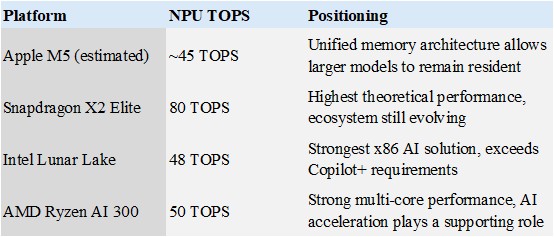
Source: "NPU Comparison 2026: Intel vs Qualcomm vs AMD vs Apple," LocalAIMaster, 2026.
A Small Experiment
Imagine the same AI workload:
Generating 100 Stable Diffusion images at 512×512 resolution locally.
The most interesting questions are not:
- Which machine is fastest?
- Which benchmark score is highest?
The more practical questions are:
- How much battery percentage was consumed?
- Did the chassis exceed 45°C?
- Did the fans become excessively loud?
What users really care about is:
Will my laptop turn into a hand warmer?
According to 2026 testing data, Snapdragon X Elite consumes approximately 41.23 joules per generated Stable Diffusion image on its NPU, while an Apple M3 MacBook Air consumes approximately 87.63 joules ("NPU Comparison 2026," 2026).
In mobile scenarios, efficiency often matters more than peak performance.
There is, however, an important gray area.
These benchmarks are conducted under ideal conditions.
If your AI workload requires more than 32GB of memory, an M5 Max system with unified memory can allocate up to 128GB of shared memory resources.
Lunar Lake systems are limited to 32GB of soldered memory.
Under extreme AI workloads, Apple possesses an advantage that competitors currently cannot replicate.
Part 6: The Overlooked Reality — Battery Life Matters More Than Performance
How Most People Actually Use Their Computers
The overwhelming majority of users:
- Do not edit 8K video.
- Do not train AI models.
- Do not spend time running benchmark suites.
What they do every day is:
- Browse the web
- Attend Zoom meetings
- Write documents
- Respond to Slack or Teams messages
In recent years, the laptops with the highest customer satisfaction ratings have often not been the fastest.
They have been the least frustrating.
Snapdragon X Elite laptops can deliver between 15 and 20 hours of battery life during real-world productivity workloads, approximately 40% longer than comparable x86 laptops ("NPU Comparison 2026," 2026).
The Surface Laptop 7 can even reach approximately 18.5 hours.
For professionals who work on the move, this means leaving the charger at home.
That sense of freedom is often more valuable than a 20% improvement in CPU performance.
Part 7: Why There May Be No "Best Processor" Over the Next Five Years
There used to be universal answers.
For example:
"Buy a Core i7."
Today, the answer depends entirely on who you are.
Creators
Apple M5 is often the strongest fit.
Video-production workflows are mature.
Applications such as Final Cut Pro and Logic Pro are deeply optimized.
The unified memory architecture also supports large local AI models.
The trade-off is clear:
You become tied to Apple's hardware upgrade cycle and cannot expand memory later.
Business Professionals
Snapdragon X Elite may be the better choice.
Battery life is exceptional and mobile productivity is outstanding.
However, you should first verify that all mission-critical applications have ARM-native versions available.
If your company still depends on an internal tool developed in 2015, migration costs may eliminate any battery-life advantages.
Enterprise Users
Lunar Lake remains the safest option.
Compatibility is strongest.
Deployment costs are lowest.
IT departments rarely need to rewrite scripts or rebuild workflows.
The downside is that battery life still trails ARM competitors by approximately four to six hours.
Meanwhile, Arrow Lake's desktop performance has damaged some confidence in Intel's brand direction ("Apple Silicon vs Intel 2026: 3x Power Gap [Tested]," Tech Insider, 2026).
Gamers
None of these platforms represents the ideal solution.
Apple's gaming library still lags behind Windows.
Snapdragon X's Adreno integrated graphics remain underwhelming at 1080p medium settings.
Intel's Arc 140V is significantly stronger than previous generations but still trails AMD's Radeon 890M.
Many gamers may be better served by AMD's Strix Point platform or by waiting for future generations of discrete GPU solutions.
Part 8: An Interesting Observation From the Past Year
After spending a year following Reddit discussions, enthusiast forums, and user reviews, I noticed something surprising.
People rarely regret buying a laptop because it is not fast enough.
Instead, they regret purchases because of issues such as:
- Poor battery life: expected 8 hours, received 4 hours
- Software incompatibility: discovering a critical application does not work after the return window closes
- Excessive fan noise: creating awkward situations in libraries and meeting rooms
- Excessive weight: carrying it daily feels like exercise, leading users to rely on their phones instead
Part 9: A Decision Framework for Ordinary Consumers
Question 1: Which Software Do You Use Most?
Choose software first.
Choose the processor second.
If your workflow depends on legacy CAD software or proprietary plug-ins, x86 remains the safest choice.
Question 2: How Long Are You Away From a Power Outlet?
If you frequently work on the move, prioritize battery life.
Ignore manufacturer "maximum battery life" claims.
Focus on real-world testing involving Zoom, browsers, and document editing.
Question 3: Will You Use AI Heavily Over the Next Three Years?
If the answer is yes, pay attention to:
- NPU TOPS (40+ TOPS is generally required for Copilot+ features)
- Memory capacity (local LLMs often require 32GB or more)
- AI ecosystem support (OpenVINO, MLX, QNN, and similar frameworks)
Question 4: Do You Depend on Legacy Software?
If yes, prioritize x86 systems.
Windows on ARM's Prism emulator can run most applications, but kernel-level drivers and specialized plug-ins may still fail.
Question 5: Does Your Budget Include the Cost of Experimentation?
Switching platforms always introduces friction.
If you rely on a single primary computer and cannot tolerate several days of workflow disruption, conservative choices are usually wiser.
If you own multiple devices or are willing to spend time adapting, the risks of trying a new platform become much more manageable.
Conclusion: The Real Competition Is Only Beginning
For the past twenty years, Intel defined what a laptop computer was.
For the next decade, Apple, Qualcomm, and Intel are competing for something much larger:
Not the fastest CPU.
But the right to define the next generation of personal computing.
For consumers, the most important change may not be that computers are becoming faster.
It may be that, for the first time, there are three fundamentally different philosophies to choose from:
- Apple sells an integrated experience.
- Snapdragon sells mobile-first computing.
- Intel sells compatibility and an open ecosystem.
And none of them wins every category.
That may be the most interesting outcome of all.
References
1. "Intel CPU Roadmap 2025-2026: Arrow Lake Refresh, Panther Lake & Nova Lake," Hardware Times, 2025
2. "Apple Silicon vs Intel 2026: 3x Power Gap [Tested]," Tech Insider, 2026
3. "Windows On ARM App Compatibility Guide: The 2026 Tier List," WiTechPedia, 2026
4. "Gaming Momentum Speeds Up on Snapdragon X Elite with Fortnite and Easy Anti-Cheat Compatibility," Signal65, 2025
5. "Deploy Any Application to Windows on Arm in Minutes with Cloudpaging," Numecent, 2025
6. "Intel Confirms Panther Lake Launch in 2025, Nova Lake Scheduled for 2026," TopCPU, 2025
7. "NPU Comparison 2026: Intel vs Qualcomm vs AMD vs Apple," LocalAIMaster, 2026
8. "ASUS Zenbook A14 UX3407 vs Microsoft Surface Laptop 7th Edition 15 Side-by-Side Laptop Comparison," RTINGS, 2021-2025
Sofia Laurent
Principal Computing Systems Researcher
Sofia Laurent specializes in personal computing systems and user-facing hardware technologies. Her research focuses on the intersection of performance, efficiency, and product design, with particular interest in how engineering decisions translate into real-world user experiences.
Recommended for you